This Post is in continuation to the previous demonstration of Spring Boot Simple Calculator application http://rbc-spring-boot-samples.blogspot.com/
Here we look at adding spring-security component to our application
It includes
1) Service configuration
2) Client authentication
Service Configuration
1) Maven
Add the security starter dependency
Restart the Application. The Spring scanner looks for Spring Security being loaded into the classpath and adds the below Filters in the chain:
Creating filter chain: org.springframework.security.web.util.matcher.AnyRequestMatcher@1, [org.springframework.security.web.context.request.async.WebAsyncManagerIntegrationFilter@338a4c61, org.springframework.security.web.context.SecurityContextPersistenceFilter@36665c11, org.springframework.security.web.header.HeaderWriterFilter@4152bd0f, org.springframework.security.web.csrf.CsrfFilter@24018c8b, org.springframework.security.web.authentication.logout.LogoutFilter@4c41a177, org.springframework.security.web.authentication.UsernamePasswordAuthenticationFilter@10d4b573, org.springframework.security.web.authentication.ui.DefaultLoginPageGeneratingFilter@62ab5e63, org.springframework.security.web.authentication.www.BasicAuthenticationFilter@2b6fcca1, org.springframework.security.web.savedrequest.RequestCacheAwareFilter@3a709cc7, org.springframework.security.web.servletapi.SecurityContextHolderAwareRequestFilter@3e01796a, org.springframework.security.web.authentication.AnonymousAuthenticationFilter@839755f, org.springframework.security.web.session.SessionManagementFilter@e4b54d3, org.springframework.security.web.access.ExceptionTranslationFilter@2976ef56, org.springframework.security.web.access.intercept.FilterSecurityInterceptor
Importantly, it generates a default security password:
Default user id: user
Using generated security password: 0xxxxxx1-7xx5-4xx9-8xxf-2xxxxxxxxxxx9
2) Client authentication
Hit the URL : http://localhost:7070/add?number1=34&number2=44
It takes you to the Basic authentication Page as below:
 Give the User: User password : 0xxxxxx1-7xx5-4xx9-8xxf-2xxxxxxxxxxx9
It shows the Result as 78 after successful login
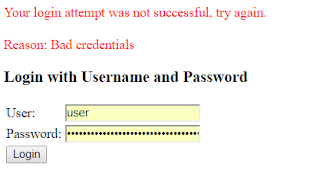
Otherwise it shows:
Here we look at adding spring-security component to our application
It includes
1) Service configuration
2) Client authentication
Service Configuration
1) Maven
Add the security starter dependency
<dependency>
   <groupId>org.springframework.boot</groupId>
   <artifactId>spring-boot-starter-security</artifactId>
</dependency>
Restart the Application. The Spring scanner looks for Spring Security being loaded into the classpath and adds the below Filters in the chain:
Creating filter chain: org.springframework.security.web.util.matcher.AnyRequestMatcher@1, [org.springframework.security.web.context.request.async.WebAsyncManagerIntegrationFilter@338a4c61, org.springframework.security.web.context.SecurityContextPersistenceFilter@36665c11, org.springframework.security.web.header.HeaderWriterFilter@4152bd0f, org.springframework.security.web.csrf.CsrfFilter@24018c8b, org.springframework.security.web.authentication.logout.LogoutFilter@4c41a177, org.springframework.security.web.authentication.UsernamePasswordAuthenticationFilter@10d4b573, org.springframework.security.web.authentication.ui.DefaultLoginPageGeneratingFilter@62ab5e63, org.springframework.security.web.authentication.www.BasicAuthenticationFilter@2b6fcca1, org.springframework.security.web.savedrequest.RequestCacheAwareFilter@3a709cc7, org.springframework.security.web.servletapi.SecurityContextHolderAwareRequestFilter@3e01796a, org.springframework.security.web.authentication.AnonymousAuthenticationFilter@839755f, org.springframework.security.web.session.SessionManagementFilter@e4b54d3, org.springframework.security.web.access.ExceptionTranslationFilter@2976ef56, org.springframework.security.web.access.intercept.FilterSecurityInterceptor
Importantly, it generates a default security password:
Default user id: user
Using generated security password: 0xxxxxx1-7xx5-4xx9-8xxf-2xxxxxxxxxxx9
2) Client authentication
Hit the URL : http://localhost:7070/add?number1=34&number2=44
It takes you to the Basic authentication Page as below:

It shows the Result as 78 after successful login
Otherwise it shows:

